
5 Membership Site Features UK Creators Need to Avoid Failed Payments
Every membership site needs five features working together: recurring payment processing, gated content delivery, member accounts with profiles, basic CRM tools, and GDPR-compliant security. Miss any one of these and you either lose revenue, lose trust, or spend your evenings manually chasing failed payments. Everything else, from gamified badges to community forums, is a layer you add once these five are solid.
TL;DR:
- Recurring payment support and gated content delivery are essential, with Stripe and GoCash being reliable options for subscription processing.
- Successful membership sites require a member portal with profiles, basic CRM, and security compliance before adding community or gamification features.
- Handling flexible billing, automation, and detailed analytics is crucial for retention and growth, especially at larger scales.
- Mobile responsiveness, search functionality, and support channels like live chat and helpdesks significantly impact user experience and trust.
- Custom development should be considered only when standard platforms cannot meet complex needs like member-specific pages or advanced integrations.
Table of Contents
- What are the essential membership site features?
- Payments, billing and member lifecycles
- Content types and gated delivery
- Community and member engagement features
- Member management, CRM and profiles
- Analytics, reporting and retention tools
- Security, compliance and privacy
- Integrations, extensibility and developer options
- How to choose which features to build or buy
- Mobile-friendly UX and the member portal
- Personalisation options that increase perceived value
- Gamification elements: badges, points and leaderboards
- Mobile app support beyond responsive design
- Search functionality within the membership site
- Customer support features: live chat and helpdesk integration
- Agency perspective: what building membership projects actually teaches you
- How Jr-digital builds membership sites that fit the business, not a template
- Sources
- FAQ
What are the essential membership site features?
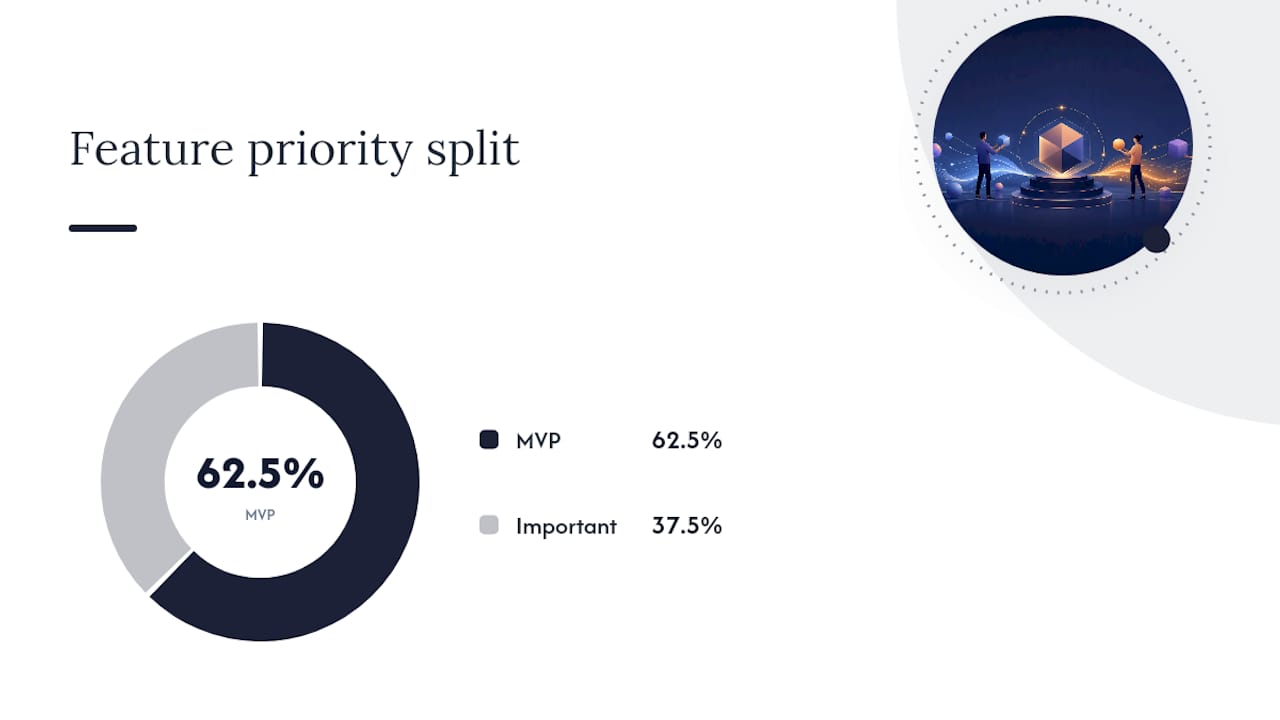
Building a membership site without a checklist is how founders end up bolting on a forum in month three, discovering their payment processor cannot handle proration, and rebuilding the member portal twice. Work through these eleven categories in order and you avoid most of that.
- Recurring payment processing (MVP) — you need a processor that handles subscriptions natively, not just one-off charges. Stripe and GoCash both support recurring billing out of the box; bolting subscription logic onto a basic checkout is a common early mistake.
- Gated content delivery (MVP) — the mechanism that locks pages, videos, or downloads behind a membership tier. Without this, you have a blog with a donate button, not a membership site.
- Member accounts and profiles (MVP) — login, password reset, and a basic profile page. This is the foundation everything else sits on.
- Basic CRM/member management (MVP) — a way to see who joined when, what they paid, and whether they are active. Even a simple admin dashboard counts here.
- Security and compliance (MVP) — GDPR-compliant consent capture and a PCI-compliant payment flow. This is non-negotiable the moment you take a card number.
- Tiered membership plans (important) — multiple price points let you capture more of the market without building separate sites.
- Email automation (important) — welcome sequences, renewal reminders, and win-back emails run without you touching a keyboard.
- Analytics and reporting (important) — churn rate and monthly recurring revenue are the two numbers that tell you if the business works.
- Community features (nice-to-have early, important at scale) — forums or discussion threads increase retention once you have enough members to make them lively.
- Integrations with third-party tools (nice-to-have) — Zapier or Make connections to your accounting software or email platform save hours a month.
- Gamification and personalisation (nice-to-have) — badges, progress bars, and tailored content recommendations. Genuinely useful, but only after the basics run smoothly.
Pro Tip: Build against this list in the order shown. A membership site with brilliant gamification but a clunky checkout will lose more members than one with a plain design and a payment flow that just works.
The BrightMinded feature checklist arrives at a similar list independently, covering payment processing, event management, and member profiles as core building blocks, which is a useful cross-check when you are scoping your own build.
Payments, billing and member lifecycles
Recurring billing is where membership sites either make money quietly in the background or generate a steady stream of support tickets. The mechanics matter more than most founders expect going in.
You need support for monthly and annual billing cycles, free or discounted trial periods, and coupon codes for launches and promotions. Some members will want to pay for a course outright rather than subscribe, so a one-off purchase option alongside your subscription tiers widens who you can sell to.
Auto-renewal is the default expectation now, but it only works if you also handle the failure cases properly:
- Grace periods that give a member a few days of continued access after a card declines, rather than an instant lockout.
- Failed-payment retries (dunning), which automatically re-attempt a charge two or three times before cancelling.
- Renewal reminder emails sent a few days before a card is due to be charged, cutting down on surprise disputes.
- Invoicing and accounting integration, so every payment lands in your bookkeeping system without manual entry.
Card processors that don’t hold PCI DSS certification put you personally on the hook for card data security, which is a risk not worth taking for the sake of a slightly cheaper processor.
Statistic callout: Membership platform buyer guides consistently flag flexible pricing and multiple product types as a differentiator between platforms that scale with a business and ones that box it in early. If your billing system can only handle one pricing model, you will hit that ceiling faster than you think.
Content types and gated delivery
Members pay for access, but what they actually value is the experience of unlocking it. That means the delivery mechanism matters almost as much as the content itself.
A well-built membership site supports several content formats without forcing you into workarounds:
- Courses, structured as modules with clear progress tracking.
- Downloads, from PDFs to templates, gated behind the right tier.
- Video, either self-hosted or streamed through a dedicated video platform.
- Live sessions, calendar-linked and often restricted to higher tiers.
Drip content, where new material unlocks weekly rather than all at once, keeps members subscribed for longer because there is always a reason to come back next month. Sneak peeks or free previews of gated content are a proven way to convert casual visitors into paying members, since they can see exactly what they are buying before committing a card.
Video hosting deserves particular thought. Self-hosting video is cheap until your bandwidth bill arrives; a dedicated video host adds monthly cost but handles adaptive streaming and prevents your server falling over during a live launch. Paid Memberships Pro’s feature set shows how granular content restriction and drip scheduling get handled at the plugin level, which is a useful reference point even if you end up building something bespoke.
Member-specific pages, where the content and even the layout change based on who is logged in, sit at the expensive end of this spectrum. They are worth it once you have distinct member segments who genuinely need different experiences, not before.
Community and member engagement features
A membership without community features is a subscription to content. Add a forum, a messaging system, or a regular live event, and you have something members feel part of, which is a meaningfully harder thing to cancel.
The building blocks are well established. Mature community platforms like Discourse demonstrate what a healthy forum needs: threaded conversations so discussions don’t collapse into noise, tagging so members can find relevant topics, and moderation tools so one difficult member doesn’t drive out ten good ones.
Beyond the forum itself, consider:
- Direct messaging between members, which builds the kind of peer relationships that keep people subscribed.
- Mentions and tags, so members get notified when someone replies to them directly.
- Polls, useful for both engagement and genuine product feedback.
- Scheduled events, from Q&A calls to workshops, calendar-linked and reminder-driven.
Roles and reputation systems, where long-standing or highly active members get visible status, encourage the kind of participation that keeps a community from going quiet. Moderation needs a clear escalation path too. Someone on your team, even part-time, has to own it.
Pro Tip: Measure engagement by tracking returning logins and post replies, not just total sign-ups. A membership site with 500 members and 20 active posters has a different problem to one with 500 members and 200.
Member management, CRM and profiles
The back-office side of a membership site is where hours get saved or lost every single week. Good member management means you spend your time on the business, not on manually checking who paid what.
Custom profile fields let you capture what actually matters for your niche, whether that’s dietary preferences for a wellness membership or job title for a professional community. Tagging and segmentation then let you group members by behaviour or interest, which makes targeted communication possible instead of blasting the same email to everyone.
A self-service portal where members can update their own card details, download past invoices, or pause their subscription cuts down on support requests dramatically. Nobody enjoys emailing a support inbox to change their billing address.
Behind the scenes, you want:
- Member history, showing join date, renewal dates and payment record in one view.
- Event attendance tracking, for memberships that run live sessions or webinars.
- CRM integration, syncing member data with external tools if you already run sales or marketing through a separate system.
- Onboarding automation, triggering a welcome sequence the moment someone joins.
- Re-engagement triggers, flagging members who haven’t logged in for 30 or 60 days so you can win them back before they cancel.
None of this needs to be complicated at launch. A spreadsheet-style admin view with filters covers most early-stage memberships perfectly well.
Analytics, reporting and retention tools
You cannot fix churn you cannot see. The metrics worth tracking from day one are active members, monthly recurring revenue (MRR), churn rate, retention by cohort, average revenue per user (ARPU), and lifetime value (LTV).
Churn is the number that deserves the most attention because it compounds. A membership losing 5% of subscribers a month needs to replace that many just to stand still, before any growth target even enters the conversation.
- Content engagement metrics, showing which modules or posts members actually finish.
- Community activity metrics, tracking logins, posts and replies.
- At-risk alerts, flagging members whose engagement has dropped before they cancel, giving you a window to intervene.
- Custom dashboards, pulling the numbers that matter to your specific business model into one view.
BrightMinded’s platform checklist places analytics alongside CRM and payment processing as core rather than optional, which reflects how quickly a membership business without visibility into churn ends up guessing at decisions that a proper dashboard would answer in seconds.
Security, compliance and privacy
Members hand over card details and personal data the moment they sign up, and that comes with legal obligations, not just good intentions. GDPR requires clear consent capture at sign-up and a straightforward way for members to request their data or have it deleted entirely.
PCI compliance covers how payment data gets handled, and the safest approach for most membership sites is letting a certified processor like Stripe handle card storage rather than touching card numbers yourself. Role-based admin access matters too: not every team member needs full access to payment records, and audit trails let you see who changed what and when.
Practical mitigations worth building in from the start:
- Encryption for data both in transit and at rest.
- Two-factor authentication on admin logins, since a compromised admin account is far more damaging than a compromised member account.
- Regular backups, tested occasionally rather than just scheduled.
- A breach response plan, even a simple one, agreed before you need it rather than during a crisis.
Jr-digital’s own client service agreement sets out the kind of support and data-handling terms worth asking any developer or platform provider for before signing.
Integrations, extensibility and developer options
Few membership sites run in isolation. Email marketing, accounting, and analytics tools all need to talk to your membership platform, and how well they connect determines how much manual work you’re stuck doing.
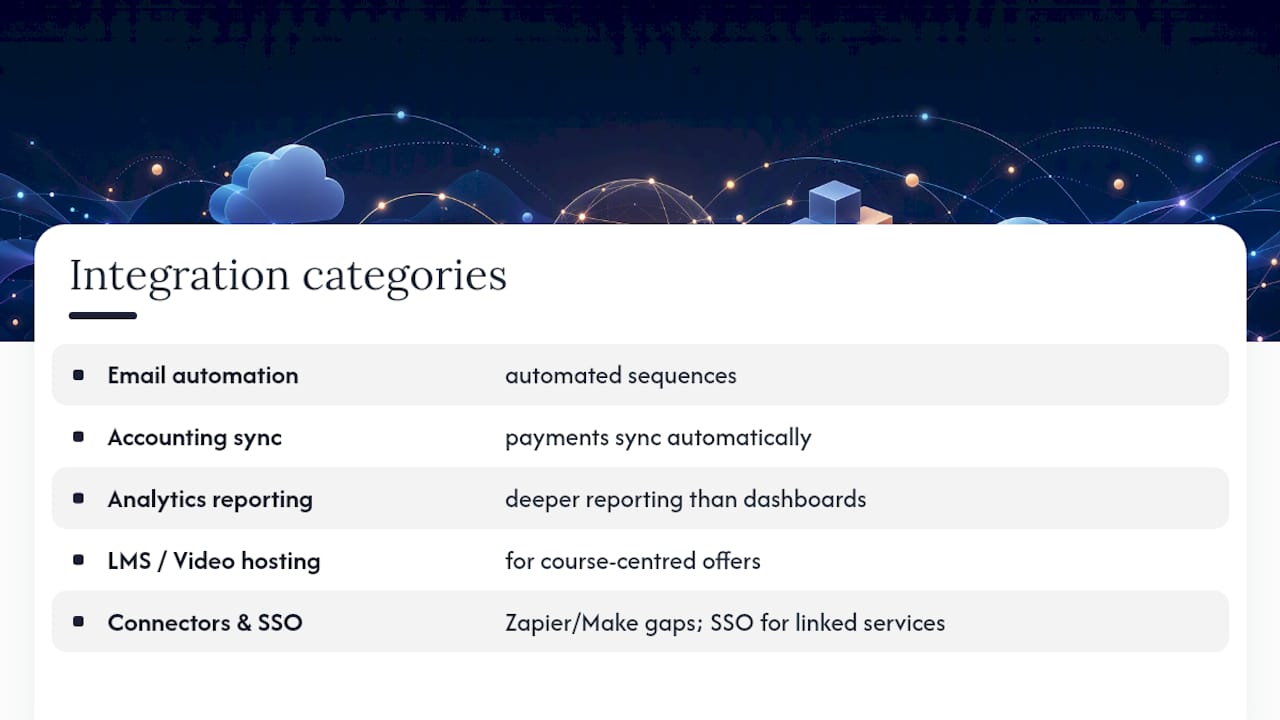
Common integrations worth checking for early: email platforms for automated sequences, accounting software so payments sync automatically, analytics tools for deeper reporting than built-in dashboards offer, and LMS or video hosting platforms if courses are central to your offer. Zapier or Make connections cover the gaps between tools that don’t integrate natively, and single sign-on (SSO) matters once you’re running multiple linked services.
API and webhook availability decides whether you’re stuck with what a platform gives you or free to build around it. Open-source options give you the most room to manoeuvre here. Paid Memberships Pro, for example, ships under a GPLv2 licence, which means developers can extend it freely rather than working within a closed vendor’s roadmap.
The trade-off is real, though. All-in-one platforms get you live faster with less engineering effort, while a composable stack of separate best-in-class tools preserves data portability and lets you swap out any single piece later without rebuilding everything else.
How to choose which features to build or buy
Start by mapping every feature against what it actually does for the business: does it drive revenue, improve retention, save admin time, or prepare you for scale you don’t have yet? Features in the first two categories earn a place in version one. Everything else waits.
- Score each feature on revenue impact. Payment flexibility and tiered plans usually score highest here.
- Score each feature on retention impact. Community and drip content tend to matter more than most founders initially assume.
- Score each feature on admin time saved. Self-service portals and automated dunning pay for themselves within months.
- Check for future scale. Will this feature still work at 10 times your current member count?
- Ask any vendor or developer about data portability, support response times, and the migration path if you outgrow them.
Pro Tip: If a platform can’t answer “how do I export all my member data” in one sentence, treat that as a warning sign, not a detail to sort out later.
Off-the-shelf platforms make sense when your membership model is fairly standard, courses plus community plus tiered pricing, and speed to launch matters more than a unique feature. Bespoke development earns its cost when your model genuinely doesn’t fit existing tools: complex tiered access rules, deep integration with an existing business system, or member-specific page architecture that needs to feel entirely custom rather than templated.
Mobile-friendly UX and the member portal
More members will check their membership on a phone during a commute than will ever open it on a desktop first. If your member portal isn’t genuinely usable on a small screen, from login through to content playback, you lose engagement before members even reach the content you built.
Responsive design is the baseline: layouts that adapt to screen size rather than forcing horizontal scrolling. But mobile-friendly goes further than that. Video should stream smoothly on a 4G connection, not just Wi-Fi. Forms need large enough tap targets that a thumb doesn’t miss the “renew” button. Navigation menus should collapse sensibly rather than cramming a desktop layout into a phone screen.
The member portal itself, where someone checks their subscription status, downloads an invoice, or updates a card, gets used more often than any single piece of content. Making that portal fast and simple on mobile has an outsized effect on how members feel about the whole membership, because it’s the interaction they have most frequently, regardless of what they actually signed up for.
Personalisation options that increase perceived value
Members notice quickly when a site treats everyone the same, and they notice when it doesn’t. Personalised content recommendations, showing a member what to explore next based on what they’ve already engaged with, keep people moving through material instead of logging in once and drifting away.
Simple personalisation starts with tagging content by topic and showing members items related to what they’ve already viewed. More advanced personalisation adjusts the homepage itself: a returning member sees “continue where you left off” rather than a generic welcome page they’ve already seen a dozen times.
Personalised email is often the highest-value place to start, since it needs less engineering than personalising the site itself. A renewal reminder that references the specific tier a member is on, or a re-engagement email that recommends content based on past activity, feels considered rather than automated, even though it runs entirely on automation.
The deepest form of this is member-specific pages, where navigation, content blocks and even the layout shift based on who’s logged in. That’s an advanced architectural decision affecting database design and caching, not a plugin setting, so it belongs later in a build once you know exactly which member segments justify the extra engineering.
Gamification elements: badges, points and leaderboards
Gamification works when it reinforces behaviour you already want, not when it’s bolted on because it looks engaging in a screenshot. Badges for completing a course module, points for community participation, and leaderboards for the most active members all give members a visible reason to keep showing up.
The risk is treating gamification as a substitute for genuinely useful content. A leaderboard on a membership site with thin content just highlights how little there is to do. Badges and points work best layered onto content and community features that already deliver value, turning “I finished this course” into something visible and worth a small moment of recognition.
Leaderboards need careful thought for member sensitivity, too. Ranking every member publicly can discourage quieter participants who add value in ways a point system doesn’t capture. Many successful memberships use gamification selectively: a “completed” badge on a course, a private streak counter for daily logins, without turning the whole site into a competition.
Start small here. A simple achievement badge system tied to course completion delivers most of the retention benefit without the engineering cost of a full points economy and public leaderboard.
Mobile app support beyond responsive design
A responsive website and a native mobile app solve different problems. Responsive design makes your site usable on a phone browser. A dedicated app adds push notifications, offline content access, and the kind of persistent presence on someone’s home screen that a bookmarked website never achieves.
Push notifications alone can justify an app for content-heavy memberships. A notification that a new module has dripped, or that a live session starts in ten minutes, reaches members in a way an email sitting unread in an inbox simply doesn’t.
Offline access matters most for course-based or video-heavy memberships, where members want to download a lesson before a flight or a commute with patchy signal. That’s a meaningfully different technical build to a standard responsive site and needs planning for from the start rather than added as an afterthought.
A native app is a genuine investment, not a checkbox feature, and it only pays off once you have enough members to justify the build and maintenance cost. Most membership sites are better served launching with an excellent mobile web experience and adding a dedicated app once member numbers and content volume justify it. Jr-digital’s app development options cover exactly this stage, for memberships that have outgrown what a browser alone can deliver.
Search functionality within the membership site
A membership site with months of accumulated courses, downloads and forum posts becomes hard to navigate without decent search. Members who can’t find something they know exists tend to assume it doesn’t, which quietly erodes the perceived value of everything you’ve built.
Basic search covers page titles and headings. Good search covers full content, including text inside PDFs and transcripts of video content, so a member searching for a specific term finds the exact lesson that mentions it, not just a list of course titles. Filtering by content type, whether that’s video, download or forum post, cuts down on scrolling through irrelevant results.
For community-heavy memberships, search needs to cover forum posts too. A member asking a question that’s already been answered three times benefits from finding that thread themselves rather than posting a duplicate question, which also reduces moderation workload.
Search is easy to deprioritise early on, since a small content library doesn’t need it. But it belongs on the roadmap well before content volume makes its absence obvious, because retrofitting decent search into years of unindexed content is a far bigger job than building it in from the start.
Customer support features: live chat and helpdesk integration
Members who hit a billing problem or a login issue at 9pm on a Sunday form their opinion of your membership in that moment, not from the content they haven’t read yet. Support features determine whether that moment builds trust or triggers a cancellation.
Live chat, even a simple widget, gives members a way to ask a quick question without leaving the page they’re on. It’s most valuable during checkout and renewal, exactly when a member is one confusing step away from abandoning a payment.
A proper helpdesk integration matters more as membership numbers grow. Routing support requests into a ticketing system rather than a shared inbox means nothing gets lost, and a member asking the same question twice gets a consistent answer both times. Self-service resources, a searchable FAQ or help centre, cut down on repetitive tickets and let members solve simple problems, like updating a card or resetting a password, without waiting for a reply.
The support channel doesn’t need to be elaborate at launch. A monitored email address with a fast response time beats a live chat widget nobody’s watching. What matters is that members know where to go when something breaks, and that the answer arrives quickly enough that frustration doesn’t turn into a cancellation.
Agency perspective: what building membership projects actually teaches you
The recurring failure point isn’t a missing feature. It’s onboarding: members join, land on a confusing dashboard with no clear next step, and disengage within the first week before the content ever gets a fair chance. Fixing that is usually about sequencing, not adding functionality.
On the technical side, we favour architecture that keeps member data portable from day one, because migrating a membership platform later is far harder than building for flexibility upfront. Member-specific page architecture, where layout and content genuinely change per member rather than just access, is worth the extra engineering cost only when member segments are distinct enough to need it. For most launches, that decision can wait until real usage data justifies it.
— James
How Jr-digital builds membership sites that fit the business, not a template
If you’ve read this far, you already know the gap between a membership site with the right features and one bolted together from mismatched plugins. Bespoke membership sites and applications are built without generic themes, with payment logic, member portals, and integrations tailored to each business rather than using one-size-fits-all templates.
That starts with a proper build on the web development options page, covering the custom application work a membership site needs beyond a standard business website. If your membership relies on churn dashboards or cohort reporting, the data analytics options cover bespoke tracking built around your actual metrics rather than a generic template report. And if your team needs secure email and file storage behind the scenes to run the operation, Cloud Office Setup handles that groundwork.
An off-the-shelf plugin is often the right call for a first version with a tight budget. Once your membership model needs something a template genuinely can’t do, get in touch with Jr-digital to scope what a bespoke build would actually look like for your business.
Sources
A handful of sources are worth bookmarking if you’re deep in the planning stage of a membership build.
FAQ
What are the three types of membership?
Membership sites generally fall into content memberships, community memberships and support memberships, and many successful sites blend two or three of these models rather than sticking to one.
What is a membership site?
A membership site is a website that restricts certain content, community access or services to paying subscribers, using gated content delivery and recurring billing rather than one-off sales.
What is the best platform for a membership site?
There’s no single best platform. Off-the-shelf tools work well for standard courses-plus-community models, while bespoke development, such as the custom builds Jr-digital delivers, suits businesses whose tiered access rules or member-specific pages don’t fit a template.
Can you give me some examples of membership websites?
Common examples include online course platforms with drip-fed lessons, professional communities with forums and events, and association websites offering member directories alongside content, each blending the content, community and support models differently.