
Marketing teams: template first reporting dashboard drives decisions
A marketing reporting dashboard exists to trigger decisions, not to display numbers. Build an executive scorecard with three headline metrics first, then add one operational view underneath it for the team running campaigns day to day. Every metric on either view should connect back to pipeline, revenue, or conversions. If a number doesn’t move a decision, it doesn’t belong on the screen.
TL;DR:
- Most dashboards should focus on cross-referenced metrics directly linked to pipeline, revenue, or conversions, avoiding any data that does not inform decisions.
- Tailor dashboards to specific roles with distinct views, such as executive scorecards for high-level metrics and operational dashboards for campaign details, limiting the number of metrics to eight to twelve per view.
- Data collection must be centralized, with a single source of truth and consistent definitions across platforms, to ensure reliability and prevent metric drift.
- Design dashboards with clear visual hierarchy, showing targets and prior period comparisons alongside actuals, and include annotations for large fluctuations to build trust and facilitate action.
Table of Contents
- What types of marketing dashboards do you actually need?
- How many metrics should a marketing KPI dashboard include?
- How do you gather, connect and clean the underlying data?
- How do you design a dashboard people will actually trust?
- What mistakes ruin most marketing dashboards?
- What do ready-to-use dashboard templates look like?
- How JR Digital approaches a bespoke dashboard build
- Which tools should you use to build the dashboard?
- How do you automate updates and set up alerts?
- What security and privacy issues should you plan for?
- How do you customise dashboards for different stakeholders?
- How do you turn dashboard numbers into a better strategy?
- The three numbers I’d insist on above everything else
- Get a bespoke dashboard built around your business
- Sources
- FAQ
What types of marketing dashboards do you actually need?
Different roles need different screens, and mixing them is the fastest way to make a dashboard nobody trusts. Geckoboard’s dashboard examples span everything from CMO summaries to channel-specific views, and the pattern is consistent: each audience gets one job to do with their screen, not five.
Here’s how the main types break down and what belongs on each:
- Executive/CMO dashboard. Six to eight headline metrics covering revenue impact, pipeline contribution, and overall spend efficiency. This is a printable, one-page scorecard, not a data explorer.
- Campaign manager dashboard. Spend pacing against plan, top five campaigns by performance, and an experiment tracker showing what’s being tested and what the results say so far.
- Web analytics dashboard. Sessions by source, conversion funnel drop-off points, and page-level diagnostics for wherever traffic is stalling.
- Social and ads dashboards. Engagement rate, reach, ROAS, and creative-level performance so you can see which assets are actually earning their spend.
- Email dashboard. Open rate, click-through rate, list growth, and unsubscribe trend, usually on a weekly cadence.
- SEO dashboard. Organic sessions, keyword position movement, and indexed page count, tracked monthly rather than daily since search rankings shift slowly.
A useful habit borrowed from practitioner guidance: design each tile to answer one specific question the viewer will ask, such as “is marketing on track?†or “which campaign do I scale?†A tile that doesn’t answer a real question is decoration.
How many metrics should a marketing KPI dashboard include?
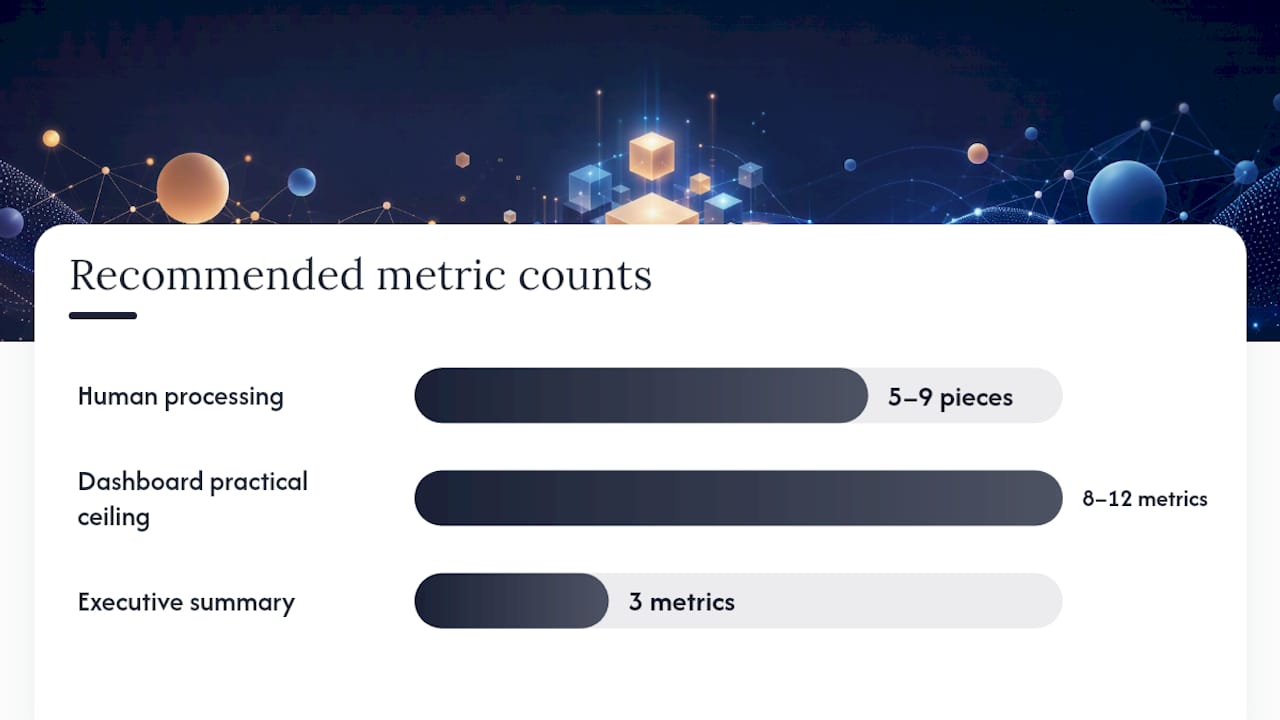
Eight to twelve metrics per view is the practical ceiling, and the reasoning isn’t arbitrary. Cognitive load research suggests people can process roughly five to nine pieces of information at once before comprehension drops, which is why metric bloat is the single most common failure in dashboard design.
Pro Tip: If you’re struggling to cut a dashboard down, ask whether removing a metric would change anyone’s next action. If the answer is no, remove it.
Group your metrics into five categories and pick from each rather than dumping everything you can measure onto one screen:
- Acquisition — new leads, cost per lead, traffic by channel
- Revenue — pipeline value, closed revenue, average deal size
- Engagement — click-through rate, time on page, email opens
- Volume — total sessions, impressions, campaign reach
- Efficiency — CAC, ROAS, cost per conversion
The exact bundle depends on the business model. An ecommerce team leans on revenue per session, cart abandonment rate, and ROAS by channel. A lead-generation business prioritises cost per qualified lead, lead-to-opportunity conversion, and pipeline velocity. A SaaS company needs trial-to-paid conversion, CAC payback period, and expansion revenue from existing accounts. None of these need more than a dozen tiles, and the executive layer above them needs only three: a pipeline-to-spend ratio, a win rate, and a CAC payback figure.
How do you gather, connect and clean the underlying data?
Start by inventorying every place marketing data currently lives, because most teams discover their numbers are scattered across four or five disconnected tools before they’ve written a single query. Google Analytics 4, Google Ads, Meta Ads, and a CRM are the usual suspects, and each defines “conversion†or “lead†slightly differently unless you force them into agreement.
- Pick a single source of truth. Choose either your CRM or a data warehouse as the place where core metrics get calculated once, then feed every dashboard from that single calculation rather than letting each platform report its own version of the same number.
- Choose a connector approach that matches your timeline. Quick-connector tools paired with Looker Studio can produce a working dashboard in hours; building an ETL pipeline into a proper warehouse takes days to weeks but gives full control over definitions; and some setups combine GA4, Google Ads, and Meta Ads through purpose-built connectors that sit between the two extremes.
- Run a data mapping checklist. Unify how “lead†and “conversion†are defined across every platform, normalise dates and time zones so a campaign launched at 11pm doesn’t appear split across two days, standardise currency if you operate internationally, and de-duplicate contact records before they inflate your lead count.
- Assign a KPI owner. One person should hold responsibility for locking metric definitions and reviewing them on a set cadence, because metric drift creeps in the moment two people calculate the same KPI two different ways.
Funnel’s guide to marketing dashboards makes a similar point about data preparation: the dashboard is only as trustworthy as the mapping work done before a single chart gets built. Skipping this step is why so many dashboards get abandoned within a quarter.
How do you design a dashboard people will actually trust?
Visual hierarchy decides whether a dashboard gets used daily or ignored after week two. Put headline KPIs at the top in large type, trend lines in the middle to show direction, and one diagnostic tile per question towards the bottom for anyone who needs to dig deeper.
Numbers without context are close to meaningless on their own. Every metric needs a target, a comparison to the prior period, and ideally a short annotation explaining any major swing, because a viewer who sees revenue jump 40% with no explanation will either ignore it or waste twenty minutes investigating something you could have explained in one sentence.
- Show the target next to the actual figure, not on a separate tab.
- Compare against the same period last month and last year where seasonality matters.
- Annotate anomalies directly on the chart rather than leaving them for a meeting.
- Limit each view to one diagnostic tile per genuine business question.
Governance keeps a well-designed dashboard from decaying. Assign a KPI owner, review the numbers weekly with whoever needs to act on them, and keep a simple change log so anyone can see when a definition shifted and why.
| Design principle | What it prevents |
|---|---|
| Headline KPIs sized largest, at the top | Viewers hunting for the number that matters |
| Target and prior-period comparison on every metric | Numbers being read without context |
| One diagnostic tile per business question | Screen clutter that buries the real signal |
| Named KPI owner and weekly review | Slow metric drift across platforms |
| Change log for definition updates | Confusion when a number suddenly shifts |
What mistakes ruin most marketing dashboards?
Most dashboards fail for the same handful of avoidable reasons, and nearly all of them show up before the first review meeting even happens.
- Vanity metrics survive too long. Impressions and page views feel good to report but rarely drive a decision on their own; cut anything that doesn’t connect to pipeline or revenue.
- Definitions disagree across platforms. If “lead†means one thing in the CRM and another in Google Ads, every downstream number is unreliable.
- Executive and operational views get mixed onto one screen. A CMO wants three numbers and five seconds; a campaign manager wants twenty numbers and twenty minutes. Serving both audiences the same layout satisfies neither.
- No annotation on unusual movements. A spike or drop with no explanation trains viewers to distrust the dashboard entirely.
Before sharing any dashboard, run it through a short checklist: confirm the metric count sits within the eight to twelve range, confirm a named owner exists for every definition, confirm the data refreshed within the promised window, and confirm at least one annotation explains the most recent significant change.
What do ready-to-use dashboard templates look like?
Templates save the guesswork of a blank canvas, though Geckoboard’s own guidance is right that a template only becomes useful once you’ve stripped out whatever doesn’t apply to your business. Here are three layouts worth adapting directly into Looker Studio, Power BI, or whichever tool you’re using.
Executive scorecard. Top row: three headline KPIs in large type, typically pipeline-to-spend ratio, win rate, and revenue against target. Middle: a channel trend line showing performance over the last twelve weeks. Bottom: a short “wins and losses†strip, three lines of text naming what worked and what didn’t.
Campaign manager view. Top: spend versus plan as a simple progress bar per channel. Middle: top five campaigns ranked by return, refreshed weekly. Bottom: an experiment tracker listing what’s currently being tested, the hypothesis, and the result so far. Fusedash’s approach to internal marketing dashboards recommends structuring this around channel performance, funnel conversion, and experiment tracking as three distinct panels rather than one crowded view.
Client-facing report. Outcomes lead, not activity. Open with the result (leads generated, revenue influenced), follow with two or three sentences of plain narrative explaining why, then one diagnostic chart if the client wants to see the mechanics. Nobody paying for marketing wants to open a report and see impressions first.
How JR Digital approaches a bespoke dashboard build
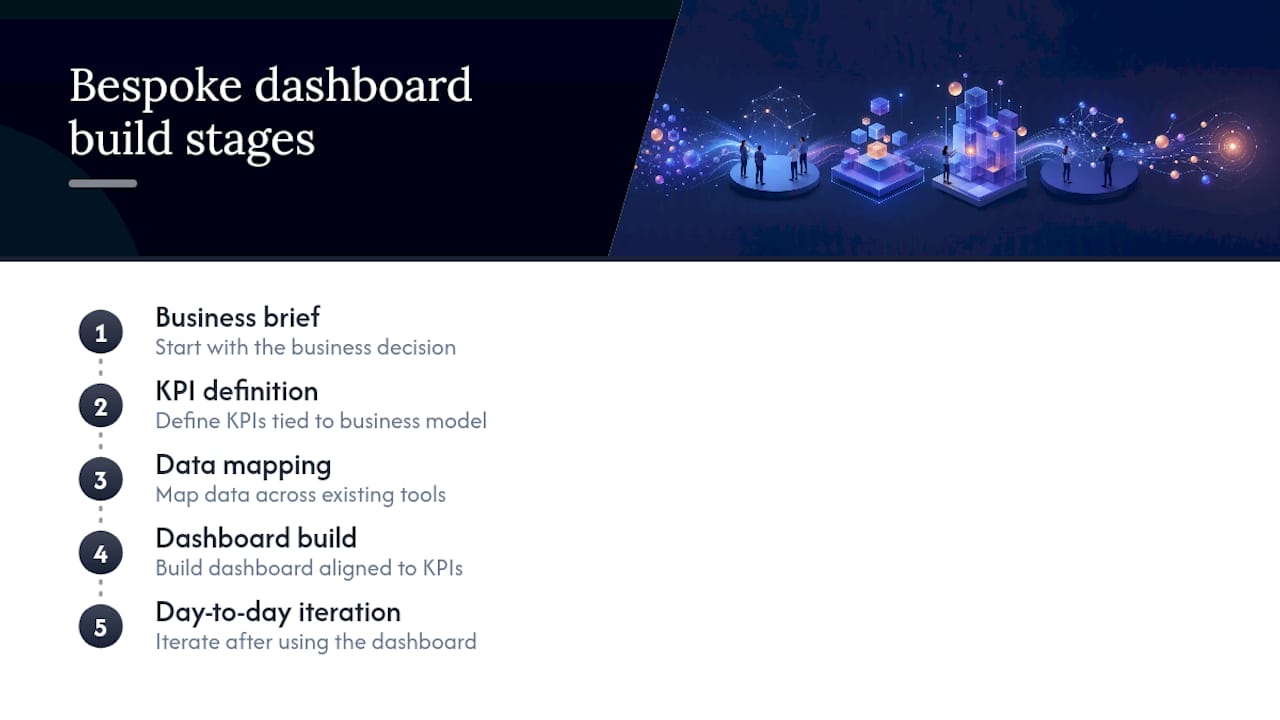
A dashboard build should start with the business decision, not the software. A typical engagement runs brief, then KPI definition, then data mapping across your existing tools, then the build itself, then a round of iteration once you’re using it day to day.
Clients typically come away with clearer decision-making because the metrics on screen actually map to their business model, alongside stronger lead quality once vanity metrics stop crowding out the numbers that matter. Every build is bespoke rather than templated, which is the same principle behind Jr-digital’s wider service list. Readers who want to see the standard of finished work can browse examples on the portfolio page before scoping their own project.
Which tools should you use to build the dashboard?
The right tool depends on how much customisation you need versus how quickly you need something live. Google’s free option, formerly Data Studio and now branded Looker Studio, connects directly to GA4 and Google Ads and is the fastest route to a working dashboard, though it can strain once you’re blending several non-Google data sources or need advanced calculated fields.
Power BI suits teams already inside the Microsoft ecosystem, particularly if data already lives in Excel or Azure, and it handles larger datasets with more computational headroom than most free tools. The trade off is a steeper learning curve for anyone who isn’t already comfortable with its query language.
Tableau remains a strong choice for visually complex, exploratory dashboards where users want to click through and interrogate the data themselves rather than glance at a fixed layout. It’s powerful but often overkill for a team that just needs a weekly scorecard.
Setups that combine GA4, Google Ads, and Meta Ads can be assembled in minutes using template-driven connector products, in hours using Looker Studio with native connectors, or over days to weeks when the data first needs to land in a proper warehouse for full control. Choose based on how long you can tolerate imperfect definitions before they start costing you credibility with stakeholders.
How do you automate updates and set up alerts?
Manual refreshes are the reason most dashboards go stale within a month. Native connectors in Looker Studio, Power BI, and most dedicated marketing dashboard products refresh automatically on a schedule you set, usually hourly or daily depending on the data source’s own limits.
Real-time reporting matters most for paid media, where a campaign overspending its daily budget needs catching within hours, not at the next weekly review. Scheduled reporting suits slower-moving metrics like SEO rankings or monthly cohort revenue, where daily refreshes add noise without adding insight.
Alerts turn a passive dashboard into an active one. Set threshold-based alerts for the numbers that genuinely require same-day action, such as cost per lead exceeding a set ceiling or conversion rate dropping below a defined floor, and route them to email or a shared channel rather than expecting someone to notice the change by checking the dashboard unprompted. Keep the alert list short. A dashboard that pings you fifteen times a day trains you to ignore all fifteen.
What security and privacy issues should you plan for?
Marketing data includes customer contact details, purchase history, and behavioural tracking data, all of which carry real privacy obligations. Any dashboard connected to a CRM or ad platform needs access controls that limit who can see what, since not every stakeholder needs visibility into individual customer records just to see a channel performance summary.
Restrict dashboard access by role rather than sharing one broad link with an entire team. Most dashboard tools support view-level permissions, so a client-facing report can show aggregated outcomes without exposing the underlying customer-level data that produced them. Where dashboards pull personal data from a CRM, check that data handling complies with UK GDPR requirements, particularly around how long identifiable customer data is retained inside third-party reporting tools.
Third-party connectors and embedded scripts are worth auditing periodically, since each new integration is another point where customer data leaves your direct control. Keep a record of which platforms have API access to your marketing data and revoke it for any tool no longer in active use.
How do you customise dashboards for different stakeholders?
Role-specific layouts solve part of the problem, but stakeholders within the same role often need different depth. A head of department wants aggregated performance across every channel their team runs; an individual contributor running one campaign wants granular detail on that campaign alone and doesn’t need to see the department-wide roll-up cluttering their view.
Build layered access rather than one dashboard trying to serve everyone. A department-level view aggregates by channel or campaign type, while an individual contributor’s view filters down to just the campaigns they own, ideally using the same underlying data so numbers never disagree between the two layers.
Finance stakeholders usually want cost and return framed in accounting terms, revenue recognised, spend committed versus spend forecast, while a creative team wants engagement and content performance with cost stripped out almost entirely. Building one filterable dashboard with saved views per stakeholder group is usually more maintainable than building five separate dashboards that each need updating every time a metric definition changes.
How do you turn dashboard numbers into a better strategy?
A dashboard only earns its place once someone uses it to change a decision, not just to confirm what already happened. Start every review by asking the three questions a good dashboard is built to answer: is marketing on track, what needs attention today, and which campaign should be paused or scaled.
Look for the divergence between plan and actual first, since a channel underperforming against its own target tells you more than a channel simply performing worse than another channel with a different budget and audience. When a metric moves sharply, check the annotation before reacting. A drop in conversion rate caused by a tracking change looks identical to a genuine performance drop unless someone has logged the cause.
Where you can, validate a campaign’s impact with an incremental lift test using a small holdout group rather than trusting attribution alone, since a campaign that can’t demonstrate lift beyond what would have happened anyway struggles to justify its share of budget. Treat the weekly review as the moment strategy actually shifts. A dashboard that gets glanced at but never triggers a reallocation of spend has become a status report, which is exactly the trap the best dashboards are built to avoid.
The three numbers I’d insist on above everything else
Cut every dashboard down to three executive metrics and I’d keep pipeline-to-spend ratio, win rate, and CAC payback. Together they force marketing to answer for revenue rather than activity: pipeline-to-spend shows whether budget is converting into opportunity, win rate shows whether that pipeline is any good, and CAC payback shows how long the business waits to get its money back. Every other metric is useful context. These three are the ones that end arguments in a budget meeting.
— James
Get a bespoke dashboard built around your business
Templates get you started, but they rarely fit a business with its own sales cycle, its own definition of a qualified lead, and its own mix of channels. Building dashboards from the brief up rather than fitting a business into a predefined layout matters most once reporting needs go beyond what free connectors can stitch together.

Three plans cover most needs: Essential Analytics at £9,999 one-off or £10 a month suits a business that needs its first clean, decision-ready dashboard; Growth Analytics at £19,999 one-off or £20 a month adds deeper channel and funnel tracking for teams running multiple campaigns; and Custom Tracking at £34,999 one-off or from £35 a month is built for businesses with bespoke attribution needs, such as multi-touch B2B pipelines or ecommerce with complex product catalogues. A typical engagement follows a process including briefing, KPI definition, data mapping, building, and iteration, involving a KPI owner to ensure consistent performance definitions. Visit the data options page to see which plan fits your current setup and get a scoped quote.
Sources
- A comprehensive guide to marketing dashboards — Funnel
- Marketing dashboard examples — Geckoboard
- Marketing analytics dashboard guide — 1ClickReport
- Marketing analytics dashboard pitfalls — Saras Analytics
FAQ
What should be in a marketing dashboard?
A marketing dashboard should include eight to twelve high-impact metrics per view, split across acquisition, revenue, engagement, volume, and efficiency categories, with an executive layer of just three headline numbers on top. Every metric needs a target and a comparison to the prior period so the viewer has context, not just a raw figure.
What are the four types of dashboards?
The four most common types are executive or CMO dashboards, campaign manager dashboards, web analytics dashboards, and channel-specific dashboards covering social, ads, email, or SEO. Geckoboard’s example gallery illustrates each with a distinct layout and audience.
What is the five second rule for dashboards?
The idea is that a viewer should understand the state of performance within about five seconds of looking at a dashboard, which is why headline KPIs belong at the top in large type with clear context. If a viewer has to hunt or calculate anything themselves, the layout needs simplifying.
Can ChatGPT create dashboards?
ChatGPT can help draft a dashboard structure, suggest KPI bundles, or write formulas for a spreadsheet, but it can’t connect live to your CRM, GA4, or ad accounts to build a working, auto-refreshing dashboard on its own. For a fully connected, bespoke build tailored to your actual data sources, a dedicated tool or an agency build such as Jr-digital’s Essential Analytics service is the more reliable route.
How much does a marketing reporting dashboard cost to build?
Costs vary widely depending on how many data sources need connecting and how custom the tracking needs to be. Jr-digital’s plans start at £9,999 one-off for Essential Analytics, rising to £34,999 one-off for Custom Tracking builds with bespoke attribution.